Published: 7 Nov 2026


A smooth live casino experience relies on several pieces of technology working together. Your internet connection, device, browser and the live dealer platform all need to communicate efficiently. When something slows that process down, you may notice frozen video, delayed actions, buffering or a noticeable gap between what happens at the table and what appears on your screen.
This online casino guide explains what causes latency and the practical steps you can take to troubleshoot common performance problems. It is designed to help players understand the technology behind live dealer games and make informed decisions, rather than encourage gambling.
What you'll learn in this article:
- What latency means and why it can cause lag
- How your internet connection affects live dealer streaming
- Which device and browser settings can create problems
- Practical ways to reduce buffering and delays
- What to check if problems continue
What Is Latency?
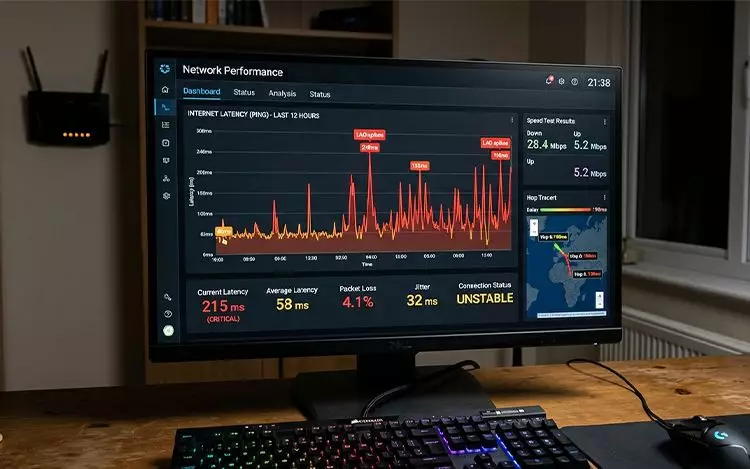
Latency is the time it takes for information to travel between your device and the remote server handling the online service. It is normally measured in milliseconds (ms).
For a live casino, information is travelling in both directions. Video from the dealer needs to reach your device, while your interactions need to reach the relevant game system. If that communication is delayed, the stream or controls may appear out of sync.
Latency is not the same as internet speed. A connection can have a high download speed but still experience delays if there is network congestion, a weak wireless signal or another issue affecting the connection.
The UK Gambling Commission recognises that technical factors such as network speed and end-user device performance can affect time-sensitive gambling experiences. Its technical standards require relevant risks to be considered where speed of interaction can significantly affect a customer's experience.
Why Do Live Casino Games Lag?
Several factors can contribute to lag.
|
Unstable internet |
A weak Wi-Fi signal, network congestion or a busy connection can interrupt a live video stream. Other people streaming video, downloading large files or using bandwidth-intensive applications on the same network can also affect performance. |
|
An overloaded device |
Your phone, tablet or computer has limited processing resources. Running multiple apps, browser tabs or background processes can leave fewer resources available for streaming. Older hardware may also struggle with demanding web pages, particularly when video and interactive elements are running simultaneously. |
|
Browser problems |
An outdated browser, excessive cached data or incompatible extensions can interfere with how a website loads and operates. Privacy tools, content blockers and other browser extensions can sometimes prevent specific website features from functioning correctly. Apple, for example, notes that website data, extensions and certain privacy or network settings can affect how Safari behaves. |
|
Software and operating-system issues |
Running an outdated operating system can create compatibility problems. Updates often include performance improvements, security fixes and support for newer web technologies. |
How to Reduce Live Casino Lag
Start with the simplest solutions before making major changes to your setup.
- Check your connection. Move closer to your Wi-Fi router or, where practical, use a wired Ethernet connection on a compatible computer. If you are using mobile data, check that your signal is strong.
- Pause other activities. Stop large downloads and close other services that are streaming video or using significant bandwidth.
- Close unnecessary tabs and apps. This frees processing and memory resources for the browser and live stream.
- Restart your device. A simple restart can clear temporary software issues and background processes that may be affecting performance.
- Update your software. Install available operating-system and browser updates. This is particularly important if a website reports that your browser is outdated.

Optimise Your Browser
Your browser settings can make a noticeable difference.
First, make sure you are using a current version of a mainstream browser supported by the website. If one browser is struggling, testing another current browser can help establish whether the problem is browser-specific.
Next, review your extensions. Temporarily disabling unnecessary extensions can help identify whether one is interfering with the page.
Clearing cached website data can also be useful when a particular site is behaving unexpectedly. Apple recommends clearing website data as one troubleshooting option for Safari performance and loading problems.
Do not automatically disable security or privacy features simply to make a page work. If a setting is causing a compatibility problem, understand what it does before changing it and restore it afterwards where appropriate.
Optimise Your Device
A few basic adjustments can help your device concentrate on the live stream.
Keep your operating system updated and maintain enough free storage for normal device operation. Close applications you are not using and avoid running several demanding tasks simultaneously.
On a laptop, connecting the charger may also prevent aggressive power-saving behaviour from reducing performance.
If you regularly use your device for online casino games, online slots or other video-heavy websites, keeping the hardware and software reasonably up to date can make everyday browsing more reliable.
|
If a live stream starts lagging, change one thing at a time. Check your connection first, then close unnecessary apps and tabs, and finally test another supported browser. This makes it easier to identify what is actually causing the problem. |
What If the Problem Continues?
If lag remains after troubleshooting, check whether other websites or streaming services are also running slowly. If they are, the issue may be your connection or network rather than the live casino platform.
If everything else works normally but one particular game continues to freeze, reload or disconnect, the issue may be specific to that website or service. In that situation, check the platform's technical guidance or contact its support team.
The UK's remote gambling technical standards also contain provisions concerning interrupted gambling, requiring operators to have fair procedures for dealing with service interruptions.
Importantly, do not keep refreshing or repeatedly attempting actions simply because a game appears frozen. Wait for the page or connection to recover and check the applicable game or platform information before continuing.
Final Thoughts: Build a Smoother Setup
Prime Casino players can make live dealer sessions more technically reliable by understanding the basics of latency and taking a few practical precautions. A stable connection, current browser, updated device and uncluttered system can all help reduce avoidable interruptions.
Technology can improve how smoothly a game is displayed, but it cannot change the underlying outcome of a casino game. If you choose to gamble, keep your activity within limits that are comfortable for you and make playing responsibly part of your approach.
|
Gambling should always remain within your means. Only gamble if you are legally permitted to do so, never use gambling to address financial difficulties, and take a break if your play stops feeling controlled. |
FAQ
What causes live casino games to lag?
Common causes include unstable internet connections, network congestion, an overloaded device, outdated software, browser problems and extensions that interfere with website functionality.
Does faster internet eliminate latency?
Not necessarily. Download speed and latency are different measurements. A fast connection can still experience delays if the network is congested or the connection is unstable.
Can clearing my browser cache fix live casino lag?
It can help if outdated or corrupted website data is contributing to a loading problem. It is one troubleshooting step rather than a guaranteed solution.
Should I change my device if live casino games keep lagging?
Not immediately. First check your connection, close unnecessary applications, update your software and test another supported browser. If problems persist across different services, your device or network may need further investigation.