Published: 7 Nov 2026


A live casino experience depends on more than the game itself. A stable internet connection, compatible device, up-to-date software and a functioning streaming service all play a part. When something goes wrong, knowing how to identify the likely cause and work through a few simple fixes can help you resolve the issue without unnecessary frustration.
For players using a licensed online casino, technical interruptions should also be handled fairly.
The UK Gambling Commission's technical standards require operators to have fair procedures for dealing with interrupted gambling and to avoid systematically disadvantaging customers.
What you'll learn from this guide:
- The most common live casino streaming problems
- How to identify the likely cause of a streaming issue
- Simple troubleshooting steps to try
- Common mistakes that can create or worsen streaming problems
- When to contact Prime Casino support
Common Live Casino Streaming Problems
Streaming problems can appear in several ways. Recognising the symptoms can help you narrow down the cause.
|
The video keeps buffering |
If the dealer's video repeatedly pauses or takes a long time to load, your internet connection may be unstable or too slow for the stream. Network congestion can also cause temporary buffering. Start by checking whether other websites or streaming services are working normally. If they are also slow, the problem may be with your connection rather than the casino. |
|
The video freezes |
A frozen image can be caused by connection instability, browser issues, an overloaded device or temporary problems with the streaming service. Try refreshing the page first. If that does not work, close unnecessary browser tabs and applications before reopening the game. |
|
The stream has no sound |
If you can see the live video but cannot hear anything, check your device volume and confirm that the casino game's audio has not been muted. If you are using headphones or external speakers, check that the correct audio output is selected. It is also worth checking whether sound works elsewhere on your device. This can help determine whether the problem is specific to the game or your device. |
|
The game will not load |
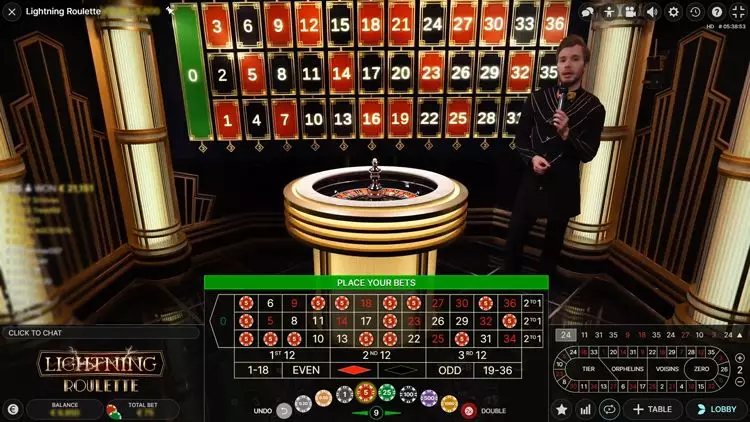
A live casino table may remain stuck on a loading screen or fail to open altogether. Browser cache problems, outdated software, incompatible settings or temporary service issues can all contribute. If other games, such as online slots or table games, load normally while one particular live game does not, the problem may be specific to that game or its streaming service. |

How to Troubleshoot Streaming Problems
Once you know what is happening, work through these steps one at a time.
- Check your internet connection - Test your connection by opening another website or service. If possible, move closer to your Wi-Fi router or switch to another stable connection.
- Refresh the game - A simple refresh can clear a temporary loading problem. However, if you were in the middle of a game when the connection failed, check your account or game information before taking further action.
- Restart your browser or app - Completely close the browser or casino app and reopen it. This can clear temporary software problems that a normal refresh does not resolve.
- Close unnecessary applications - Video streaming uses device and network resources. Closing other demanding applications or browser tabs may improve performance.
- Update your browser or device - An outdated browser, operating system or app can sometimes cause compatibility problems. Installing available updates can help prevent these issues.
- Try another supported device - If the stream continues to malfunction, testing it on another compatible device can help establish whether the problem is related to your original device.
|
Before repeatedly refreshing a live casino game, check whether a round may already have been processed. If you are unsure what happened, pause and check your account or game history rather than immediately trying to repeat an action. |
Common Mistakes That Cause Streaming Problems
Some streaming difficulties are avoidable. A few common mistakes can put unnecessary strain on your connection or device.
|
Using an unstable connection |
Playing over a weak Wi-Fi signal can result in buffering, freezing and sudden disconnections. If your connection is consistently unreliable, resolving the connection problem first is better than repeatedly restarting the game. |
|
Keeping too many tabs open |
Multiple video streams, downloads and demanding browser tabs can consume bandwidth and device resources. Close anything you do not need before starting a live stream. |
|
Ignoring software updates |
Using an outdated browser or operating system can create compatibility issues. Keeping your software current can reduce the likelihood of avoidable technical problems. |
|
Using a VPN or restrictive network settings |
A VPN, firewall or other network configuration can sometimes affect connection speed or interfere with streaming. If you use one, check whether temporarily disconnecting it resolves the issue, provided doing so is safe and permitted on your network. |
|
Repeatedly reconnecting without checking what happened |
One of the biggest mistakes is simply clicking or playing again without first checking the status of the previous session. This can create confusion about whether an action was completed. |
Prime Casino's terms state that, in the event of a system malfunction, wagers are void and that specific procedures apply where a game is interrupted by system, telecommunications or computer-system failure.
What to Do If the Problem Continues
If the usual troubleshooting steps do not work, stop and gather some basic information before contacting support.
Make a note of:
- The name of the live casino game
- The approximate time the problem occurred
- The device and browser or app you were using
- What happened, such as freezing, buffering or disconnection
- Any error message displayed
- Whether the problem affected other games or services
- Screenshots, where useful
This information can help Prime Casino's support team investigate the issue more efficiently.
If a technical problem affects a game or account balance, avoid continuing to play until you understand what happened.
When Should You Stop Troubleshooting?
Not every streaming problem needs extensive troubleshooting. If restarting your connection or browser does not solve the issue, continuing to experiment may not be worthwhile.
In particular, pause if:
- Your balance does not look correct.
- You are unsure whether a game action was processed.
- A game result appears inconsistent with what you expected.
- You repeatedly lose connection.
- You receive an unexplained error message.
At that point, contacting customer support is the more appropriate next step. Avoid trying to overcome an unresolved technical problem by continuing to gamble.
Final Thoughts: Keep Your Streaming Experience Under Control
Prime Casino players experiencing live casino streaming problems can usually start with a few straightforward checks: test the internet connection, refresh the session, restart the browser or app, close unnecessary applications and make sure their software is current.
The key is to troubleshoot methodically rather than repeatedly interacting with a game when its status is unclear. If a technical problem affects a wager, game result or account information, pause the session and seek clarification. A calm approach can make it easier to establish what happened and what should happen next.
|
Technical problems should never encourage you to spend more time or money trying to continue a gambling session. Keep within your personal limits, take breaks and only gamble with money you can afford to lose. If gambling becomes difficult to control, consider using appropriate safer-gambling tools and seeking support. |
FAQ
Why does my live casino stream keep buffering?
Buffering is often associated with an unstable or congested internet connection, but device, browser and service issues can also contribute. Test your connection, close unnecessary applications and restart your browser or app.
What should I do if my live casino video freezes during a game?
Avoid immediately repeating an action. First check your connection and determine whether the game session or account information has updated. If you cannot establish what happened, contact customer support.
Can my browser cause live casino streaming problems?
Yes. An outdated browser, excessive open tabs, cached data or compatibility issues can affect streaming. Restarting the browser, clearing relevant temporary data and installing available updates may help.
Should I keep playing if my live casino stream keeps disconnecting?
It is better to pause if repeated disconnections make the status of a game or transaction unclear. Check your account information and contact Prime Casino support if necessary rather than continuing to play through an unresolved technical problem.